
VPS vs shared hosting: when is it time to move?
Modern shared hosting is more capable than its reputation suggests: CloudLinux isolates each account’s resources, you can pick your PHP version, Node.js runs, and email is included. So the question is no longer “can shared hosting cope,” but “when is root-level control worth the responsibility.” This guide looks, from a developer’s perspective, at where that line really is.
The technical difference: a managed account vs your own machine
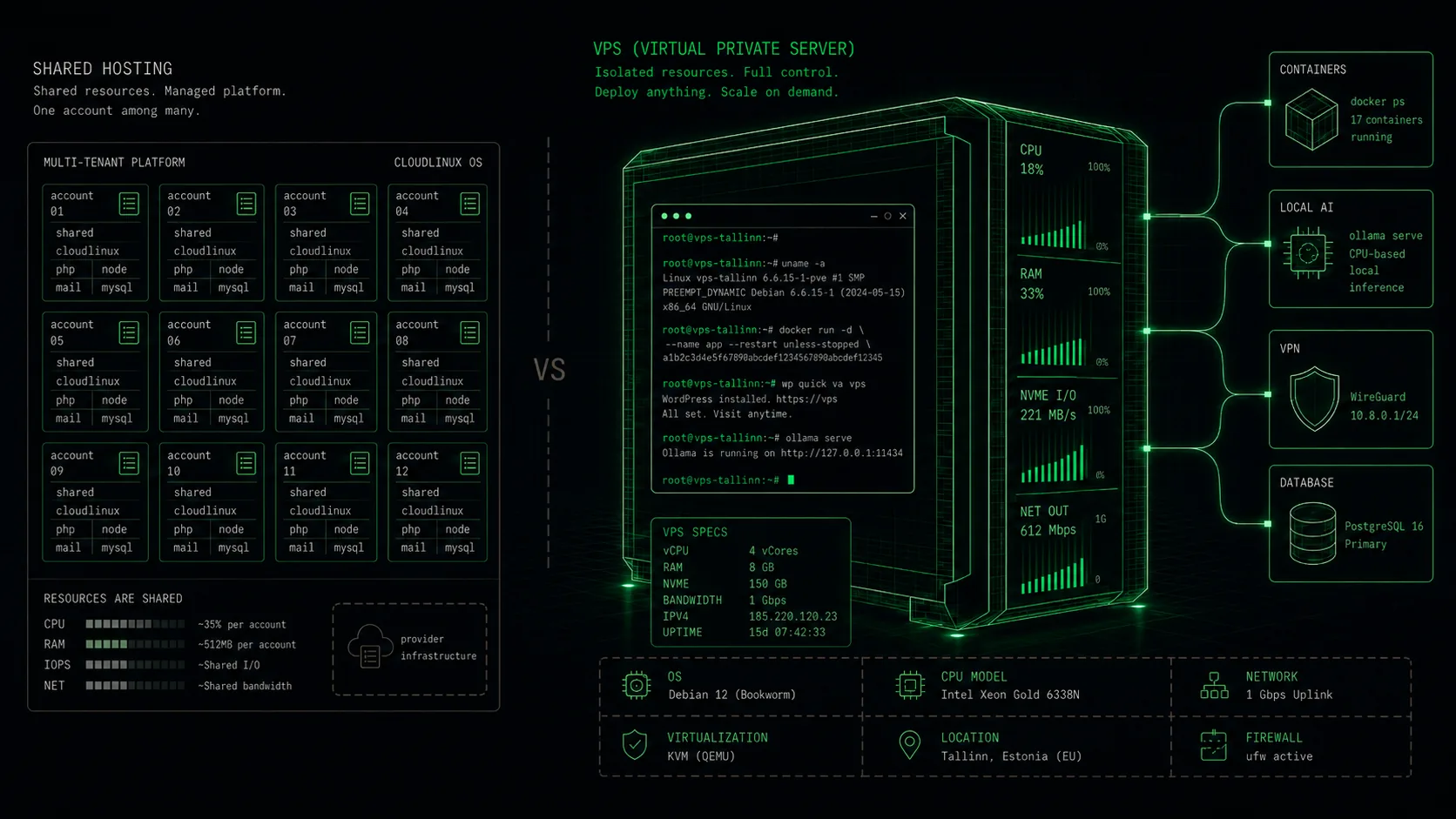
On shared hosting you have a managed account on a shared server - but modern platforms isolate accounts. CloudLinux’s LVE gives each account its own CPU, RAM and I/O limits and CageFS isolates the filesystem, so a neighbour’s load does not affect your performance. You can choose your PHP version and run Node.js. The host keeps the operating system, updates, security, backups and email running.
A KVM virtual server is your own virtual machine with full root access. You choose the operating system, control kernel settings and install any system software - including what a managed platform does not offer. The freedom is greater, but system administration is on you too.
When shared hosting is the right choice
Most websites, web apps and online shops run well on shared hosting: accounts are isolated, PHP and Node.js are selectable, and email, updates, security and backups come from the host. You do not have to administer a server or keep a mail server running.
Email in particular is a real advantage here: you get working mailboxes immediately, without dealing with sending reputation. If you do not need root access or your own system software, shared hosting saves time and money. Moving to a VPS adds operational overhead - take it on only when the limits of the shared environment genuinely start to get in the way.
Signals that it is time to move to a VPS
Clear signs: you need root access to install system software the managed platform does not offer - Docker, your own job broker (Redis, RabbitMQ), your own database engine or version, a long-running service, or a non-web workload. You want to control the operating system and kernel settings, or install your own services.
Resource ceilings matter too: when an application outgrows the limits of a shared plan or needs a larger memory budget held separately for it, your own VPS provides it. Development and test environments, API services and background jobs that require full control over the stack fit a VPS better.
What a VPS gives you - and what you become responsible for
A VPS gives you full root access, your own choice of OS and out-of-band access: a VNC console and a Debian Live rescue environment (Rescue Mode) that let you reach the machine even when the OS itself will not boot. Plus custom ISO upload, cloud-init for SSH key injection, and IPv4 rDNS. You build exactly the stack you need.
In return you take on system administration: OS updates, security patches, backups - and email. Running your own mail server on a VPS is a serious undertaking: IP address reputation and authority, rDNS/PTR, SPF, DKIM and DMARC, blacklist monitoring and deliverability. Many VPS users deliberately use an external email service or keep email on shared hosting - a perfectly reasonable choice.
How to migrate from shared hosting to a VPS
Migrating is a sequence, not a jump. Start with an inventory: PHP version, database engine and size, cron jobs, mailboxes, SSL certificates and every external service that talks to your site. Mailboxes and cron are the two that get forgotten most often, because on shared hosting they came with the panel.
Then build the same stack on the VPS and test it before the domain moves: files over rsync or scp, the database as a dump and import, then point your own machine's hosts file at the new IP and click through the site. Once it works, lower the domain TTL (300 seconds, say), wait out the old TTL and only then change the A record. Keep the old account alive for another couple of weeks - it is the cheapest insurance there is.
Virtuaal.com KVM VPS: the concrete offer
Our virtual servers run on AMD EPYC hardware with NVMe SSD RAID storage, in the CITIC Telecom data centre in Tallinn, on our AS205930 network - low latency for users in Estonia and the Baltics. Management runs in the VirtFusion panel: resources, network traffic, Rescue Mode, ISO media and server rebuild in one view.
Every plan includes free best-effort automatic backup (not guaranteed) and manual restore points on the VPS disk. Fixed plans range from C-XS (1 vCPU, 2 GB RAM) up to C-XXL (16 vCPU, 32 GB RAM), from €7.64/month on annual billing. Full root is included; basic Linux skills are assumed. If what you mainly need is working email and a managed environment, take a look at our shared web hosting too.
Frequently asked questions
Ready to launch your virtual server?
See our KVM VPS plans - AMD EPYC, NVMe SSD RAID, full root and the VirtFusion panel. Servers in Tallinn.
See VPS plans